 VPSUForm
20 Best Contact Form Plugins for WordPress (2026)
Every WordPress site needs a way for visitors to actually reach you — a contact form, a booking request, a lead form, whatever it is. It sounds like a small piece of the puzzle, but the plugin you pick affects how many leads you actually convert, how much spam lands in your inbox, and how much time you waste fighting with settings screens instead of running your business.
We went through the WordPress plugin directory (and a few premium marketplaces) and put together this list of the 20 form plugins actually worth considering in 2026. For each one, you'll find what it does well, what it charges, and where it falls short — no fluff, no "it depends" cop-outs.
What to Look for in a Form Plugin
Before jumping into the list, here's a quick checklist we used to judge each plugin:
- A drag-and-drop builder that doesn't fight you
- Conditional logic (show/hide fields based on answers)
- Multi-step forms for longer applications
- Solid spam protection out of the box
- Entry management inside wp-admin, not just email notifications
- Integrations with the tools you already use (Google Sheets, Mailchimp, Zapier, etc.)
- Reasonable pricing that doesn't punish you for wanting basic features
- A codebase that won't slow your site down
The 20 Best Contact Form Plugins for WordPress
1. VPSUForm — Editor's Choice
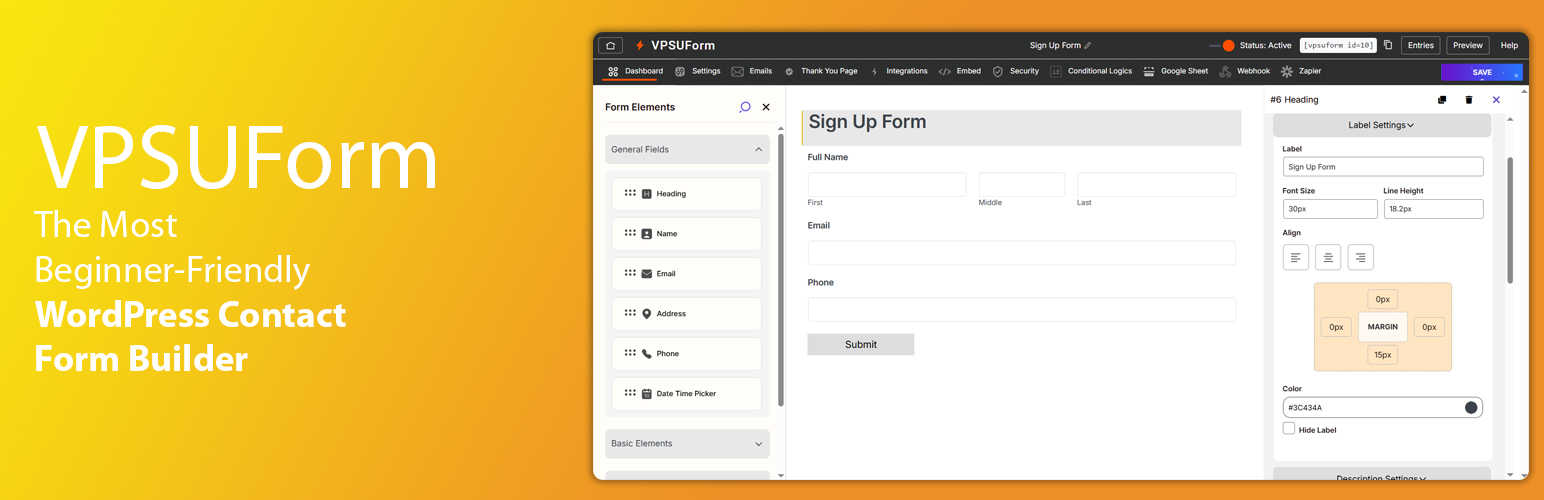
VPSUForm is the plugin we kept coming back to while researching this list. It's a genuinely modern drag-and-drop builder, and unlike a lot of competitors that nickel-and-dime you for every extra field type, it bundles automation and entry management into one place instead of scattering them across a dozen paid add-ons.
What you get:
- Drag-and-drop builder with live preview
- Conditional logic and multi-step forms
- Native Google Sheets sync and webhooks
- Zapier integration for connecting everything else
- Built-in entry management with CSV export
- File uploads and detailed email notifications
- Google reCAPTCHA and hCaptcha support
Pricing: A free core plugin covers most day-to-day needs, with paid plans unlocking automation and premium support. Check the pricing page for current rates.
Pros: fast setup, generous free tier, automation features usually reserved for higher-priced competitors.
Cons: newer to the market than names like WPForms or Gravity Forms, so the third-party tutorial ecosystem is still catching up.
Best for: businesses and agencies that want advanced automation without stitching together five different add-ons.
2. WPForms

WPForms is probably the plugin most WordPress users think of first, and there's a reason for that: the setup wizard genuinely holds your hand, and the template library covers almost anything a small business would need out of the box.
Features: smart conditional logic, 2,000+ pre-built templates, spam protection, entry management, and (on paid tiers) Stripe/PayPal payment forms plus Zapier.
Pricing: Free with WPForms Lite. Paid plans start around $49.50/year for Basic and go up to roughly $299.50/year for Elite (introductory pricing — renewals cost more).
Pros: beginner-friendly, excellent documentation, huge add-on library.
Cons: no monthly billing option, and renewal prices roughly double after year one.
3. Contact Form 7

Contact Form 7 has been around since basically the beginning of modern WordPress, and it's stuck around because it does one thing — simple forms — without any bloat. If you're comfortable pasting shortcodes and don't need a visual builder, it's hard to beat for a basic contact page.
Features: lightweight core, Akismet spam filtering, CAPTCHA support, and a huge ecosystem of free third-party add-ons for anything fancier.
Pricing: Completely free.
Pros: zero cost, tiny footprint, works with almost every theme.
Cons: no drag-and-drop editor, no built-in entry storage (submissions go straight to email unless you add Flamingo).
4. Fluent Forms

Fluent Forms is the plugin we'd point a budget-conscious developer toward. The free version already includes conditional logic and 40+ integrations — features other plugins lock behind a paywall — which makes the jump to Pro feel optional rather than mandatory.
Features: 60+ field types, conversational form mode, multi-step forms (Pro), quiz and survey fields, and native integrations with FluentCRM, Mailchimp, and Slack.
Pricing: Generous free version. Pro starts at about $79/year, with a lifetime license around $299.
Pros: best free tier in this list, fast and lightweight, transparent pricing.
Cons: the free version charges a small fee on Stripe payments; smaller template library than WPForms.
5. Gravity Forms
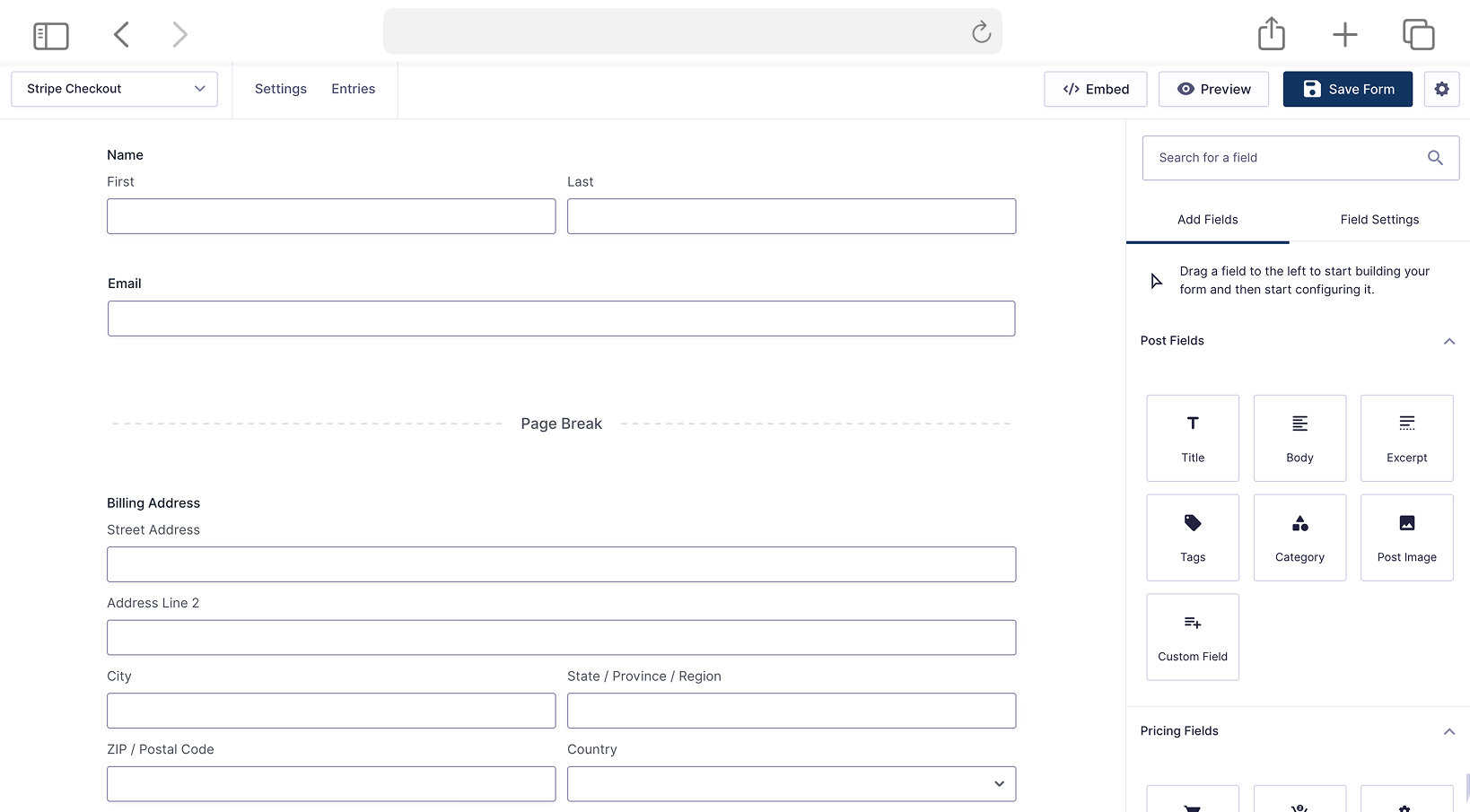
Gravity Forms is the plugin developers reach for when a client needs something genuinely complex — multi-page applications, calculated fields, or workflow approvals. It doesn't have a free version, which filters out casual users, but the payoff is a mature, extremely stable codebase with 30+ official add-ons.
Features: conditional logic on every tier, advanced calculations, surveys and quizzes (Pro/Elite), and deep integrations with Zapier, Slack, and major CRMs.
Pricing: No free tier. Basic is $59/year (1 site), Pro is $159/year (3 sites), Elite is $259/year (unlimited sites).
Pros: rock-solid reliability, no feature-gating tricks between tiers besides site count, great for agencies.
Cons: you can't try before you buy beyond a refund window, and useful third-party add-ons like GravityView cost extra.
6. Ninja Forms

Ninja Forms takes an unusual approach: instead of tiered feature bundles, it sells most of its power as individual add-ons. That's great if you only need one or two extras, but it can get pricey fast if you need several.
Features: drag-and-drop builder, unlimited forms and submissions on the free plan, file uploads and multi-step forms via add-ons, and PayPal/Stripe payment support.
Pricing: Free core plugin. Individual add-ons run $29–$129 each, or bundle plans from about $99/year (Personal) up to $499/year (Agency, all add-ons, unlimited sites).
Pros: pay only for what you actually use, friendly support team, capable free version.
Cons: à la carte pricing adds up quickly if your needs grow.
7. Formidable Forms

Formidable is less "contact form plugin" and more "no-code app builder that happens to make contact forms too." If you want to turn form submissions into searchable directories, calculators, or front-end dashboards, this is the one to look at.
Features: Formidable Views for displaying entries as tables, calendars, or grids; repeater fields; calculators; and front-end editing of posts via ACF.
Pricing: Free Lite version available. Paid plans start around $79/year (Basic) up to roughly $299.50/year for Elite (intro pricing).
Pros: genuinely powerful for data-driven sites, not just contact forms.
Cons: steeper learning curve, and custom CSS styling can be more fiddly than competitors.
8. Everest Forms

Everest Forms quietly gives away more in its free version than most competitors — file uploads, 35+ fields, and entry management are all included without a credit card. It's a solid pick if you want power without the upsell pressure.
Features: AI-assisted form generation, geolocation, e-signatures, conversational forms, and Stripe/PayPal payment collection on paid tiers.
Pricing: Free version on WordPress.org. Paid plans run roughly $69/year (Personal) up to around $249/year for full add-on access.
Pros: one of the most generous free tiers around, beginner-friendly interface.
Cons: smaller integration ecosystem than WPForms or Fluent Forms.
9. HappyForms

HappyForms is what you reach for when a client just needs a clean contact form and nothing more. Built by The Theme Foundry, it keeps the interface deliberately minimal — no overwhelming settings pages, just a fast, responsive form.
Features: lightweight drag-and-drop builder, responsive styling out of the box, and basic spam protection.
Pricing: Free on WordPress.org, with optional premium add-ons for extra functionality.
Pros: extremely light footprint, simple enough to hand off to non-technical clients.
Cons: not built for complex, multi-step, or payment-heavy forms.
10. Kali Forms

Kali Forms leans hard into spam protection, with honeypot and reCAPTCHA-style filtering baked into the free version instead of tucked behind a paywall — a nice touch if unwanted submissions have been a headache.
Features: modern templates, conditional logic, and multiple layers of anti-spam protection without needing a separate CAPTCHA plugin.
Pricing: Free core plugin on WordPress.org, with Pro add-ons available for advanced fields and integrations.
Pros: strong built-in spam filtering, clean template designs.
Cons: smaller community and fewer tutorials than the bigger names on this list.
11. JetFormBuilder

JetFormBuilder is built natively for the Gutenberg block editor, which makes it a favorite among developers already using JetEngine or the wider Crocoblock suite for dynamic content.
Features: block-based form building, dynamic form logic, post/CPT submission from the front end, and calculated fields.
Pricing: Free core plugin. Pro add-ons start around $49/year, or bundled with a Crocoblock subscription.
Pros: excellent for Gutenberg-first workflows, deep control for developers.
Cons: the learning curve is real if you're not already comfortable with blocks.
12. MetForm

MetForm is built specifically for Elementor users — if that's your page builder of choice, it slots in more naturally than plugins that just bolt on Elementor support as an afterthought.
Features: Elementor widget-based builder, 20+ integrations (Mailchimp, Zapier, Stripe, Zoho), and multi-step forms.
Pricing: Free version on WordPress.org. The Personal plan is around $49/year, with lifetime bundle deals (including other Wpmet plugins) starting near $147.
Pros: tight Elementor integration, competitively priced compared to Everest Forms and similar tools.
Cons: not much use if you're not already on Elementor.
13. weForms
weForms, from the team behind WP User Frontend, focuses on getting a form built and published fast — the drag-and-drop editor trims away a lot of the setup steps other plugins require.
Features: quick-start templates, conditional logic, and entry management, with payment and advanced integrations available on Pro.
Pricing: Free version on WordPress.org, with Pro plans for advanced integrations and payment fields.
Pros: fast to set up, clean interface.
Cons: smaller add-on ecosystem than more established competitors.
14. Forminator

Forminator is unusual in that it isn't just a form plugin — it also builds polls and quizzes, and the free version is refreshingly unrestricted. The catch is that Pro isn't sold on its own; it comes bundled with a WPMU DEV membership.
Features: forms, polls, and quizzes in one plugin, Stripe/PayPal payment forms, and conditional logic — all in the free tier.
Pricing: Free core plugin with a genuinely complete feature set. Pro-level features require a WPMU DEV membership rather than a standalone purchase.
Pros: free tier is unusually generous, all-in-one (forms + polls + quizzes).
Cons: premium features tied to a broader membership, which isn't ideal if you only want the form plugin.
15. Bit Form

Bit Form markets itself on speed, and it shows — the front-end form assets are noticeably lighter than most competitors, which matters if page speed scores are part of your job.
Features: drag-and-drop builder, workflow automation, webhook support, and integrations with common CRMs and email tools.
Pricing: Free version on WordPress.org, with paid plans for automation and premium integrations.
Pros: genuinely fast-loading, good automation features for the price.
Cons: newer plugin with a smaller community than the established players.
16. Pirate Forms
Pirate Forms is a no-frills option for small sites that just need a working contact form with basic spam protection — nothing more, nothing less.
Features: simple form builder, reCAPTCHA support, and email notifications.
Pricing: Free core plugin, with an optional Pro upgrade for extra fields and styling.
Pros: lightweight, easy for beginners, quick to configure.
Cons: limited feature set compared to nearly everything else on this list.
17. ARForms
ARForms lives on CodeCanyon rather than the WordPress.org directory, which means no free version — but it packs in a large number of pre-built templates and conditional logic rules aimed at users who don't want to build every form from scratch.
Features: 1,000+ ready-made templates, drag-and-drop styling, multi-column layouts, and PayPal/Stripe payment support.
Pricing: One-time CodeCanyon license (no recurring free tier).
Pros: huge template library, one-time payment instead of a subscription.
Cons: support and updates depend on the CodeCanyon marketplace model, which some users find less reliable than a direct vendor relationship.
18. Quform
Quform has quietly built a loyal following on CodeCanyon for years — the reviews consistently praise its support team as much as the plugin itself, which says something in a marketplace not exactly known for great after-sale support.
Features: one-click theming, drag-and-drop field builder, and a wide range of field and validation types.
Pricing: One-time CodeCanyon license (typically in the $30–40 range, per-project).
Pros: one-time cost, well-regarded support, mature and stable codebase.
Cons: no free trial version, and licensing is per-project rather than unlimited sites.
19. eForm
eForm (formerly known as FSQM Pro) leans into surveys and quizzes more than plain contact forms — automated scoring, leaderboards, and timers make it a good fit for anyone running assessments or interactive content rather than a simple "get in touch" box.
Features: quiz scoring and leaderboards, single-page checkout with Stripe/PayPal/WooCommerce, and a front-end user portal for reviewing past submissions.
Pricing: One-time CodeCanyon license.
Pros: strong quiz and survey tooling, useful for e-commerce-adjacent forms.
Cons: overkill if all you need is a basic contact form.
20. Visual Form Builder
Visual Form Builder has been in the WordPress directory for well over a decade. It's not flashy, but it does the basics — building forms visually, right inside wp-admin — reliably enough that plenty of older sites still run on it.
Features: visual drag-and-drop builder, entry storage in wp-admin, and CSV export.
Pricing: Free on WordPress.org.
Pros: free, straightforward, no learning curve.
Cons: development has slowed compared to newer competitors, so don't expect cutting-edge features.
Feature Comparison
| Plugin | Free Version | Drag & Drop | Conditional Logic | Multi-Step | Entry Management | Starting Price (paid) |
|---|---|---|---|---|---|---|
| VPSUForm | ✅ | ✅ | ✅ | ✅ | ✅ | See site |
| WPForms | ✅ | ✅ | ✅ (paid) | ✅ (paid) | ✅ | $49.50/yr |
| Contact Form 7 | ✅ (fully free) | ❌ | Add-on | Add-on | Add-on | — |
| Fluent Forms | ✅ | ✅ | ✅ (free) | ✅ (paid) | ✅ | $79/yr |
| Gravity Forms | ❌ | ✅ | ✅ | ✅ | ✅ | $59/yr |
| Ninja Forms | ✅ | ✅ | Add-on | Add-on | ✅ | $99/yr |
| Formidable Forms | ✅ | ✅ | ✅ (free) | ✅ | ✅ | $79/yr |
| Everest Forms | ✅ | ✅ | ✅ (paid) | ✅ (paid) | ✅ | $69/yr |
| Forminator | ✅ (fully free) | ✅ | ✅ (free) | ✅ (free) | ✅ | WPMU DEV membership |
How to Actually Choose
If you just want something that works and don't care about bells and whistles, Contact Form 7 or Pirate Forms will do the job for free. If you're building a business site and want room to grow — payments, automation, integrations — VPSUForm, WPForms, or Fluent Forms are the safer long-term bets. And if you're building something genuinely complex, like a multi-step application or a data-driven directory, Gravity Forms or Formidable Forms are worth the higher price tag.
A few questions worth asking yourself before you pick:
- How many sites will this run on?
- Do you need to accept payments through the form?
- Will forms have more than one step?
- Do you already use a page builder (Elementor, Gutenberg) that one of these plugins is built around?
- What's your actual budget once renewal pricing kicks in?
Frequently Asked Questions
Which is the best WordPress contact form plugin?
There isn't a single "best" — it depends on what you need. For an all-around mix of ease of use and automation, VPSUForm and Fluent Forms are our top picks. For raw power on complex projects, Gravity Forms still leads the pack.
Do I need coding knowledge to use these plugins?
No. Every plugin on this list, VPSUForm included, uses a visual builder — dragging fields onto a canvas rather than writing code.
Which plugin is best for lead generation?
Look for conditional logic, multi-step forms, and CRM integrations. VPSUForm, Fluent Forms, and WPForms all cover this well.
Can I connect my forms to Google Sheets?
Yes — VPSUForm, WPForms, Fluent Forms, and Ninja Forms all support Google Sheets, either natively or through an add-on.
Which plugin is best for beginners?
WPForms and VPSUForm both have the gentlest learning curves, thanks to setup wizards and ready-made templates.
Final Verdict
There's no shortage of solid contact form plugins for WordPress in 2026 — the honest truth is most of the plugins on this list will handle a basic contact form just fine. The differences show up once you need more: payments, automation, multi-step logic, or integrations with the rest of your marketing stack.
If you want a plugin that handles all of that without forcing you to buy five separate add-ons, VPSUForm is the one we'd start with — drag-and-drop building, conditional logic, multi-step forms, Google Sheets sync, webhooks, and built-in entry management, all in one plugin.
Try VPSUForm and see how it fits into your workflow.